
This guide explains the LED indication on various Ivideon camera models. You'll learn what different light signals mean — from power‑on and booting to connection status and errors — helping you quickly diagnose your camera's state.
- LED Indication on Ivideon Cute / Cute 2 / Cute 360 Cameras
- LED Indication on Ivideon Dome / Bullet Cameras
- LED Indication on Ivideon Dome ID12-E / Bullet IB12 / Bullet IB13 Cameras
- LED Indication on Ivideon V Mensa / Ursa Minor / Mera Cameras
- LED Indication on Ivideon Cute 3, Ivideon Leo 360, and Ivideon Cute 4 Cameras
1. LED Indication on Ivideon Cute / Cute 2 / Cute 360 Cameras
| Light Signal | Camera Status |
|---|---|
| Solid red | Camera is booting up after power‑on |
| Blinking red | Camera is waiting for a QR code |
| Blinking green | Camera has read the QR code, connecting to the cloud OR Camera has lost connection to the cloud (if it was already connected to an account) |
| Solid green | Camera is connected to the service and working |
| Solid orange | Service mode |
| Fast blinking green | Camera is updating |
2. LED Indication on Ivideon Dome / Bullet Cameras
| Light Signal | Camera Status |
|---|---|
| No light | No power, camera system is not booting |
| Solid red | Camera system is booting (indication lasts only a few seconds) |
| Blinking red | Camera is restoring settings after a reset (during normal boot the light is solid red for a few seconds, then turns green) |
| Blinking green | Camera system is finishing boot, no connection to the Ivideon cloud (the camera may be accessible locally) |
| Solid green | Camera has successfully connected and is online |
3. LED Indication on Ivideon Dome ID12-E / Bullet IB12 / Bullet IB13 Cameras
These cameras have no dedicated status LED. The IR illumination LED is used instead. It only indicates whether the camera is powered on; it cannot show network connection status or the camera's online status in the service.
Ivideon Bullet IB12/IB13 The IR LED is located on the lens at the bottom. When the camera is powered, the LED should turn on automatically, and you will hear a click as the IR filter moves over the lens. After power‑on, the IR LED will glow for about 5 seconds, then blink for a few seconds, and finally turn off automatically. | 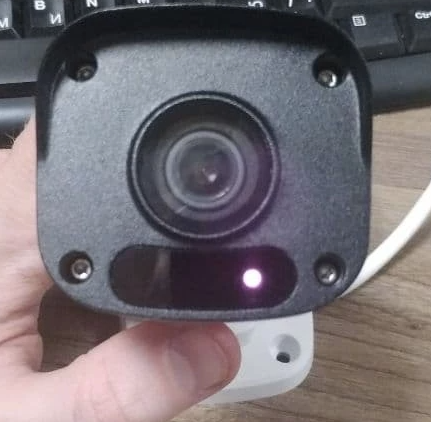 |
Ivideon Dome ID12-E The IR LED is located above the camera lens. When the camera is powered, the LED should turn on automatically, and you will hear a click as the IR filter moves over the lens. After power‑on, the IR LED will glow for about 5 seconds, then blink for a few seconds, and finally turn off automatically. | 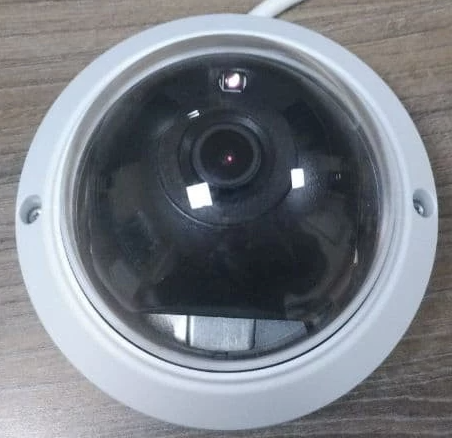 |
4. LED Indication on Ivideon V Mensa / Ursa Minor / Mera Cameras
These cameras have no dedicated status LED. The IR illumination LED is used instead. It only indicates whether the camera is powered on; it cannot show network connection status or the camera's online status in the service.
Ivideon V Ursa Minor The IR LED is located on the lens at the bottom. When the camera is powered, the LED should turn on automatically, and you will hear a click as the IR filter moves over the lens. After power‑on, the IR LED will glow for about 5 seconds, then blink for a few seconds, and finally turn off automatically. | 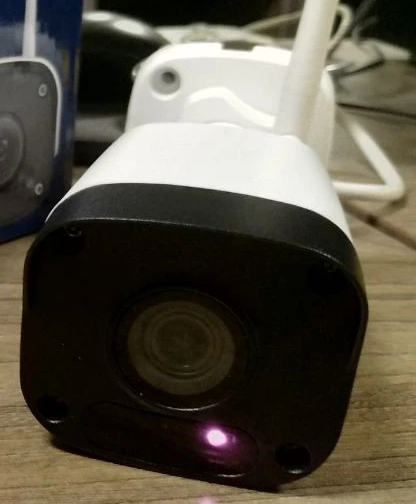 |
Ivideon V Mensa The IR LED is located above the camera lens. When the camera is powered, the LED should turn on automatically, and you will hear a click as the IR filter moves over the lens. After power‑on, the IR LED will glow for about 5 seconds, then blink for a few seconds, and finally turn off automatically. | 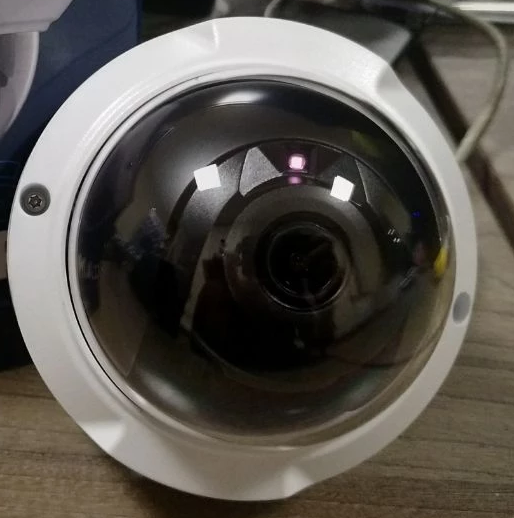 |
Ivideon Mera The IR LED is located below the camera lens. When the camera is powered, the LED should turn on automatically, and you will hear a click as the IR filter moves over the lens. After power‑on, the IR LED will glow for about 5 seconds, then blink for a few seconds, and finally turn off automatically. | 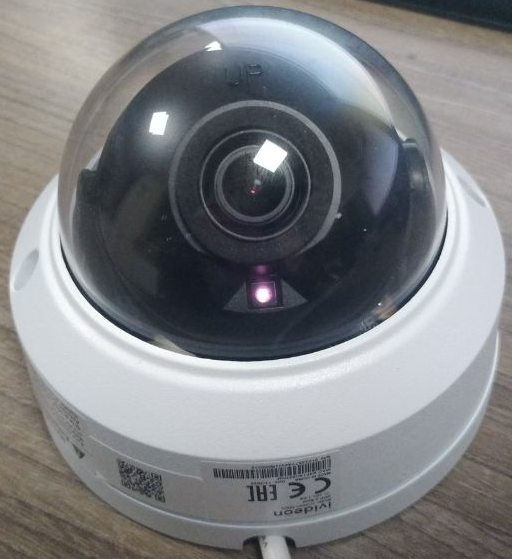 |
5. LED Indication on Ivideon Cute 3, Ivideon Leo 360, and Ivideon Cute 4 Cameras
The front panel of these devices has an LED that indicates the camera status:
| Light Signal | Camera Status |
|---|---|
| No light | Camera is off / no power |
| Solid red | Camera system is booting after restart; power is connected |
| Blinking red | Camera system has booted, waiting for connection (when switching to blinking red, the camera emits a standard beep) |
| Blinking blue | Connecting to the Ivideon service / connection to the service is lost |
| Solid blue | Camera is connected to the service |
Additional audio signals (for Cute 3, Leo 360, Cute 4):
- When the system boots (switching to blinking red) and when resetting – one short beep (sounds like a cuckoo).
- When scanning a QR code to connect to the service – one short beep.
- When scanning a QR code but failing to connect to the local Wi‑Fi network – two sets of three short beeps.
- When connecting to the cloud – one short gurgling beep.